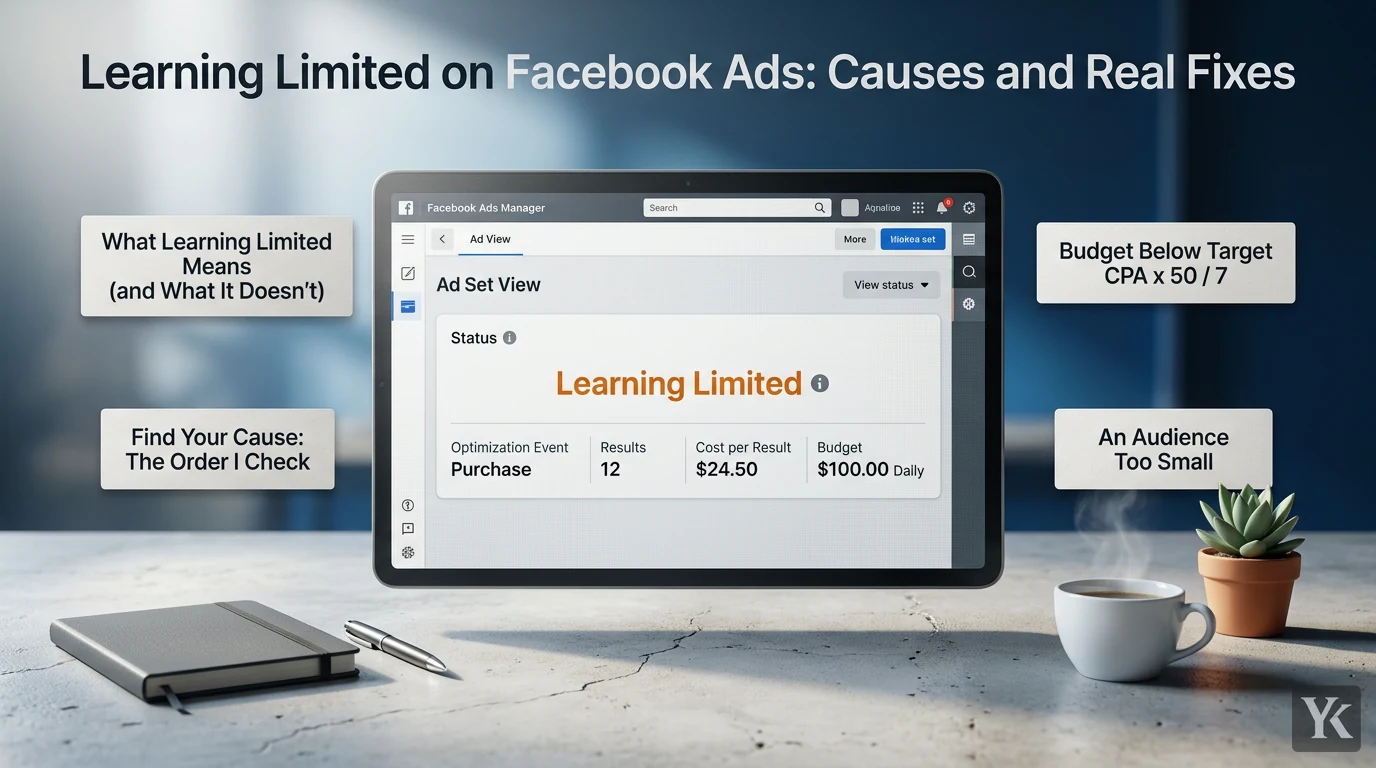
Learning Limited on Facebook ads means Meta doesn't expect an ad set to get enough optimization events to exit the learning phase. It's a warning, not a stop: the ad set keeps running. Treat the status as a diagnosis: find the cause, check the budget math, then decide whether it's worth fixing at all.
What Learning Limited Means (and What It Doesn't)
Meta defines the learning phase as "the period when the delivery system still needs to learn about how an ad set may deliver and perform," and its learning phase page adds that ad sets in it are less stable and usually have a higher CPA. Per Meta's Learning Limited page, an ad set becomes Learning Limited "when it is unlikely to receive about 50 optimization events in the week after your last significant edit."
Meta says "Learning limited isn't a penalty" and calls the status "an indication that your budget isn't being spent effectively," because the delivery system can't optimize performance with your current setup. If the ad set collects enough optimization events after its last significant edit, Meta moves it to Active on its own.
The causes Meta lists are small audience size, low budget, low bid or cost control, high auction overlap, an infrequent optimization event, or too many ads running at once. Apart from a tooltip that flags a low bid or cost control, the status doesn't say which one applies. Finding out is your job, and the wrong first move is editing, because every significant edit restarts the count.
The 50-in-7-Days Rule, and Why Your Account May Show Another Number
Meta's learning phase page says ad sets exit "as soon as they can deliver stably," which "usually occurs after about 50 results" in the week after the ad set's last significant edit. Shops ads have their own rule: at least 17 purchases through your website and 5 through Meta after 7 days.
Some accounts have shown something else. In July 2024, Jon Loomer reported that for several weeks his account had a learning phase of 10 optimized events in three days, then went back to 50 in seven with no explanation. Meta's help pages still say about 50, but its Marketing API reference for learning stage info lists three fields for a "dynamic learning phase" (dynamic_lp_status, dynamic_lp_conversions_threshold and dynamic_lp_days_threshold), described in one line each, with nothing on when they apply.
So plan budgets on 50 in 7 days, and if your account shows a different target, as Loomer's did, go by your account. Treat any other fixed number you see quoted, such as special thresholds for Advantage+ campaigns, as unconfirmed until Meta's pages say it.
Find Your Cause: The Order I Check
First add the two Ads Manager columns Meta points to: Optimization events (Columns, then Customize columns) and Last significant edit. Then work down this list, cheapest question first. Causes can stack.
1. Budget Below Target CPA x 50 / 7
If a result costs $20 and the ad set spends $100 a day, the best case is 35 results a week. At that cost, it can't reach 50 without more budget. The budget table below does this math.
2. An Audience Too Small
Narrow geography, stacked interests, short retargeting windows and heavy exclusions all shrink the pool. Meta's reasoning for expanding it: "The larger the audience, the more opportunities for people to complete your optimization event." A 7-day website-visitor audience on a low-traffic site is small by construction.
3. Events Split Across Too Many Ad Sets
Meta's page on combining ad sets says that "when you run too many ad sets at the same time, each one gets fewer opportunities to learn and therefore fewer results." Auction overlap adds to it. Your ad sets don't bid against each other: per Meta's auction overlap page, when two or more of your ads enter the same auction, only the one with the highest total value competes, which can keep an ad set from exiting learning. Duplicating an ad set to be safe adds overlap and splits the same events in two.
4. A Rare Optimization Event
Optimizing for purchases when the ad set gets eight a week is a structural mismatch. Meta's example fix is moving from purchases to add to cart, with a trade-off covered below.
5. A Cost or Bid Cap Below Your Real CPA
A cost per result goal or bid cap under what results actually cost keeps the ad set out of auctions it needs. Meta flags this one: if a low bid or cost control is the limit, a tooltip appears when you hover over the Learning Limited status. Its cost per result goal guidance suggests starting 10-20% above your average cost per result.
6. Repeated Significant Edits
If the Last significant edit date moved twice this week, the count restarted twice. Meta's advice is to wait to edit until the ad set is out of learning and to skip edits you don't expect to improve performance.
The Budget Math: Minimum Daily Budget per Ad Set
The floor for one ad set is target CPA x 50 / 7. It's a floor, not a target. Per Meta's daily budget rules, a calendar week's spend won't exceed 7 times the daily budget unless ad set budget sharing is on, so this budget buys 50 results only if they average your target CPA or less. Learning-phase CPAs usually run higher. With no CPA history yet, project a CPA from CPM, CTR and conversion rate before you size the budget.
| Target CPA | Weekly spend for 50 events (CPA x 50) | Daily budget floor per ad set (CPA x 50 / 7) |
|---|---|---|
| $5 | $250 | $36 |
| $10 | $500 | $72 |
| $20 | $1,000 | $143 |
| $30 | $1,500 | $215 |
| $40 | $2,000 | $286 |
| $60 | $3,000 | $429 |
| $100 | $5,000 | $715 |
Daily figures are rounded up. The math works the same in any currency: a hypothetical $150 target CPA needs at least $1,072 a day per ad set.
- It's per ad set. Four ad sets need four floors, which is the arithmetic case for consolidating.
- Meta's budget guidance is lower. Its minimum budget guidance says your daily budget should be at least 5 times your cost per result goal when you use that bid strategy. That meets Meta's guidance, not the learning threshold: if results cost your goal, it buys 35 a week.
- Swap in your account's number if it shows a different threshold: target CPA x events / days.
How the Meta Ads Learning Phase Counts Events
Four details decide what counts toward the 50:
- Only the optimization event. Meta defines optimization events as the outcome your ad set is currently optimized for, which can differ from the campaign objective. An ad set optimized for purchases counts purchases, not clicks or add-to-carts. One optimized for link clicks counts clicks.
- Per ad set, from its last significant edit, including under Advantage+ campaign budget.
- Inside the attribution setting. The same metric counts outcomes "based on your chosen attribution setting." A 1-day click setting credits the same conversions as 7-day click or fewer, never more.
- Not always 50. Meta recommends around 50 optimization events since the last significant edit, "but some ad sets stabilize earlier."
Why Small Markets and Language Splits Hit the Wall First
Small countries, and accounts split by country and language, are where the event math bites first. The mechanism is division: every ad set needs about 50 on its own.
Say an offer produces 90 purchases a week across three countries. In one ad set, that clears 50. Split by country and the average drops to 30. Split each country into two language versions and the average is 15. Unless one market dominates, none of the six gets to 50, though the offer converts exactly as before.
Targeting shrinks the pool further: one small country plus a language filter plus interest layers. Two things from Meta's docs help:
- One ad set can hold several countries. Meta's location targeting accepts up to 25 countries, and its ad set combining page recommends breakdowns, country included, over splitting audiences for reporting. Run the countries you serve together and read results per country.
- The language box is usually unnecessary. Meta's audience language settings page says Meta "automatically shows your ads to people who are likely to understand them," predicting language from signals such as location, groups, posts, and device and browser settings. It says to pick a language only to reach people who understand one that isn't widely spoken in your selected location, like French speakers in the US. Targeting a country's main language is the opposite case: by Meta's guidance the box can stay empty, and filling it in shrinks the pool.
Separate ad sets still make sense when countries need different offers, prices or landing pages. That's a business reason; splitting for reporting isn't.
Fixes in Priority Order
Cheapest and least disruptive first. Try one fix at a time and give it a week, or you won't know what worked.
- Stop nonessential edits. Hold routine changes, like new ads or copy tweaks, for one planned edit, then let the ad set run seven days from it. It's free, and it's the only fix that can't restart the count.
- Consolidate. Combining ad sets and campaigns is first on Meta's list of fixes. Merge ad sets with the same objective and similar audiences, keep the strongest ads, and turn off overlapping ad sets with the fewest results, moving their budget to the one you keep. Don't merge different offers or funnel stages just to clear a label.
- Broaden audience and placements. Drop exclusions and interest layers you can't justify, and widen geography to wherever you can serve customers. If you cut placements because the creative didn't fit, fix the creative; the safe zones guide for Reels, Stories and Feed covers designing one asset for all of them.
- Loosen the cap. If the tooltip blames your bid or cost control, raise it, keeping audience, creative and event unchanged.
- Raise the budget to the floor, if unit economics allow. If the table says you need triple your spend and the margin can't carry it, budget isn't your lever.
- Move to a more frequent event, last. Purchase to add to cart is Meta's example. It changes what you're buying, so track how many of those carts become purchases. For lead gen, the same trade-off runs between raw and qualified leads, and only your CRM can tell you which leads were real; lead scoring and routing is where that starts.
Edits That Restart Learning, and the Ones That Don't
Meta's significant edits page lists which changes count. Meta's Last significant edit metric page disagrees on two rows, noted in the table.
| Change | Restarts learning, per the significant edits page |
|---|---|
| Any change to targeting, ad creative or optimization event | Yes |
| Adding a new ad to the ad set | Yes |
| Changing bid strategy | Yes (the Last significant edit page says it depends on the size of the change) |
| Pausing the ad set for 7 days or longer | Yes, once you unpause (the Last significant edit page counts any pause) |
| Budget amount, ad set spending limit amount, or the bid control, cost per result goal or ROAS goal amount | Depends on the size of the change |
| Advantage+ campaign budget shifting spend between ad sets | No |
| An ad-set-level significant edit, or a new ad set, in an Advantage+ campaign budget campaign | Not for the other ad sets |
Meta's budget example is $100 to $101 (not likely to restart learning) versus $100 to $1,000 (may restart it). Neither page gives a percentage, so treat the 20% rule you'll see quoted as a rule of thumb. Under Advantage+ campaign budget, changing the campaign budget or bid strategy might send several ad sets back into learning at once.
Since adding a new ad counts, batch new creative, creator partnership ads included, into one planned edit instead of dripping it in.
Check Learning Status Across Accounts with the Marketing API
Here's a read-only way to check this in code. The Marketing API returns a learning_stage_info field on each ad set, and the learning stage info reference linked earlier documents it:
- status: LEARNING ("The ad set is still learning"), SUCCESS ("The ad set exited the learning phase") or FAIL ("The ad set isn't generating enough results to exit the learning phase"). FAIL is the closest match to Learning Limited, though the reference doesn't use that name.
- conversions: conversions since the last significant edit during learning, returned as zero once the ad set exits successfully.
- last_sig_edit_ts: the timestamp of the last significant edit that sent the ad set back into learning. The reference types it as an integer without giving the unit, so the script accepts seconds or milliseconds.
- attribution_windows: in Meta's words, the "number of days between when a person viewed or clicked your ad and subsequently took action."
- The object is only returned for active ad sets, never for Dynamic Creative ad sets, and not every ad account is eligible.
The script reads each account's ad sets through the ad account adsets edge, filters to active ones and prints every ad set not marked SUCCESS, FAIL first. It only sends GET requests. Set META_API_VERSION to the current Graph API version; the token (a system user in your business portfolio works) needs ads_read or ads_management permission from each ad account.
// Read-only: learning status of every active ad set, across ad accounts.
// Node 20+ (built-in fetch). The token needs ads_read or ads_management.
const API_VERSION = process.env.META_API_VERSION; // the current Graph API version, "vNN.0"
const TOKEN = process.env.META_ACCESS_TOKEN;
const ACCOUNTS = (process.env.META_AD_ACCOUNTS || '').split(',').filter(Boolean); // "act_111,act_222"
const FIELDS = 'name,optimization_goal,' +
  'learning_stage_info{status,conversions,last_sig_edit_ts,attribution_windows}';
if (!API_VERSION || !TOKEN) throw new Error('Set META_API_VERSION and META_ACCESS_TOKEN first');

async function getAll(url) {
  const rows = [];
  while (url) {
    const body = await (await fetch(url)).json();
    if (body.error) throw new Error(`Graph API error ${body.error.code}: ${body.error.message}`);
    rows.push(...body.data);
    url = body.paging?.next; // follow pagination
  }
  return rows;
}

// Meta doesn't give last_sig_edit_ts a unit: treat under 1e12 as seconds, else milliseconds.
function toDate(ts) {
  const n = Number(ts);
  if (!ts || !Number.isFinite(n)) return null;
  return new Date(n < 1e12 ? n * 1000 : n);
}

async function learningReport(accountId) {
  const params = new URLSearchParams({
    fields: FIELDS,
    effective_status: JSON.stringify(['ACTIVE']), // learning info is only returned for active ad sets
    limit: '100',
    access_token: TOKEN,
  });
  const adSets = await getAll(`https://graph.facebook.com/${API_VERSION}/${accountId}/adsets?${params}`);
  return adSets.map((s) => {
    const info = s.learning_stage_info; // absent for Dynamic Creative ad sets and ineligible accounts
    const edit = toDate(info?.last_sig_edit_ts);
    return {
      adSet: s.name,
      goal: s.optimization_goal,
      status: info?.status ?? 'NOT_RETURNED',
      conversions: info?.conversions ?? null, // counted since the last significant edit
      lastSigEdit: edit ? edit.toISOString().slice(0, 10) : null,
      daysSinceEdit: edit ? Math.floor((Date.now() - edit.getTime()) / 86400000) : null,
      windows: info?.attribution_windows?.join(', ') ?? null,
    };
  });
}

(async () => {
  const order = { FAIL: 0, LEARNING: 1, NOT_RETURNED: 2 };
  for (const accountId of ACCOUNTS) {
    try {
      const rows = await learningReport(accountId);
      const counts = {};
      for (const r of rows) counts[r.status] = (counts[r.status] || 0) + 1;
      console.log(accountId, counts);
      const open = rows.filter((r) => r.status !== 'SUCCESS')
        .sort((a, b) => (order[a.status] ?? 3) - (order[b.status] ?? 3));
      if (open.length) console.table(open);
    } catch (err) {
      console.error(`${accountId}: ${err.message}`);
    }
  }
})();
A FAIL row whose last significant edit is weeks old points to a structural cause (1 to 5 above), not to editing. "Across accounts" means ad accounts your token has been granted, yours or a client's. A rate-limit or permission error is printed for that account, then the script moves on. Per Meta's authorization page, the default Limited access tier is "heavily rate-limited per ad account" and for development only; production apps for live advertisers need Full access through App Review. A run or two a day is plenty. An AI agent can read the same ad accounts through Meta's official ads MCP server; keep it read-only, since it can also edit campaigns.
When Learning Limited Is Fine to Leave Alone
Learning Limited describes delivery, not profit, and Meta says the learning phase is necessary: you "shouldn't try to avoid the learning phase completely." Leave the label alone when:
- Cost per result is on target. A high-ticket offer that closes eight deals a week at a profitable CPA may never reach 50, and doesn't need to.
- The audience is small by design: an account-based list, a tight service area, a single city.
- The floor costs more than the margin can carry, and there's nothing left to consolidate.
- It's early. Meta's call is a prediction, and an ad set that still collects enough optimization events moves to Active.
Judge it on cost per lead or purchase, qualified-lead rate, margin and ROAS, not the status column. If those numbers work, Learning Limited is information, not a problem to solve today.
Frequently Asked Questions
Is Learning Limited a penalty?
No. Meta's Learning Limited page says so directly. The ad set keeps delivering; Meta just doesn't expect the current setup to reach about 50 optimization events in the week after the last significant edit.
How long does the Facebook ads learning phase last?
There's no fixed number of days. Meta says ad sets exit as soon as they can deliver stably, which usually takes about 50 results in the week after the last significant edit. An ad set Meta doesn't expect to get there within that week is marked Learning Limited.
Does pausing an ad set reset learning?
Meta's significant edits page says a pause of 7 days or longer does: the ad set re-enters learning when you unpause it. Meta's Last significant edit page counts any pause as a significant edit, so a shorter pause may restart learning too.
Digital Marketing Technologist
Yosef Kassabry is a media buyer and full-stack developer with 11+ years in paid acquisition for Arabic-speaking audiences across MENA and the Gulf, and more than $10M in managed ad spend. He runs paid media through direct buys and affiliate networks, builds his own tools, and writes about ad platforms, tracking, native ads and affiliate marketing.